No data, or the reading age keeps growing
When the NOW number is empty, stuck, or its age keeps climbing, work through these checks in order: the source, the Health permission, the sensor app, the normal delay, and the app version.
The age under NOW keeps growing and the number never changes
Why. The small line under the NOW number (for example MG/DL · 9 MIN AGO) is the age of the last reading that reached the app. It counts up until a new reading arrives, so a growing age means your source has not delivered anything new. The usual reasons: the source's own delivery delay (Apple Health up to about 60 minutes, Health Connect on Android about three hours), the app not having refreshed since it was last in the foreground, a new sensor still warming up, or a connection or permission that was never completed. In the demo the age ticks too, because the demo is simulated.
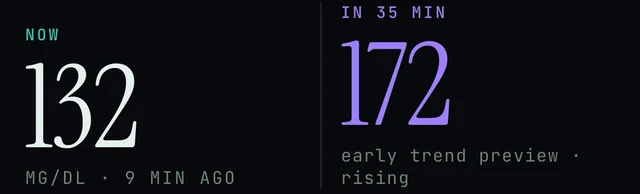
Today screen, under the NOW number: the age line tells you how old the latest reading is.

Very top of the Today screen: the demo banner (shown only in the demo) and the top-right icon that opens Settings.
Today → DEMO DATA · TAP TO LEAVE · Today → top-right icon → Settings → Report a problem
- Look at the very top of Today. If an orange banner says DEMO DATA · TAP TO LEAVE, you are looking at simulated data, not your sensor. Tap it to leave the demo. More in Demo vs live.
- Close Endobits and open it again. From version 5.1.2, Dexcom, Eversense and DIY rig connections also refresh whenever the app returns to the foreground. Earlier builds refresh only at launch.
- Open your sensor maker's own app and confirm it is still receiving readings. A brand-new sensor can need a few hours of warm-up before its first reading.
- Allow for the source's own delay. Readings through Apple Health can arrive up to about 60 minutes behind the sensor. On Android, readings through Health Connect sync every 15 minutes but arrive about three hours behind the sensor. A DIY rig is the exception and is real time.
- If the age keeps climbing past those windows, work through the sections below in order, or the three checks on Connect your sensor: the permission, whether the sensor app writes glucose at all, and time.
- Still stuck: Today → top-right icon → Settings → Report a problem (version 5.1.2 and later) and attach the diagnostics you choose. On an older build, email contact@bioconscious.tech or call +1 (236) 235-5295.
The source chip says syncing… and stays there
Why. Since version 5.1.1 the source chip reads syncing… while an upload is running: the health data upload you consented to, which calibrations travel with from 5.1.2. It normally clears on its own when the upload finishes. If it lingers, the upload is slow or stalled, usually because of a weak internet connection or because the app was sent to the background mid-upload.
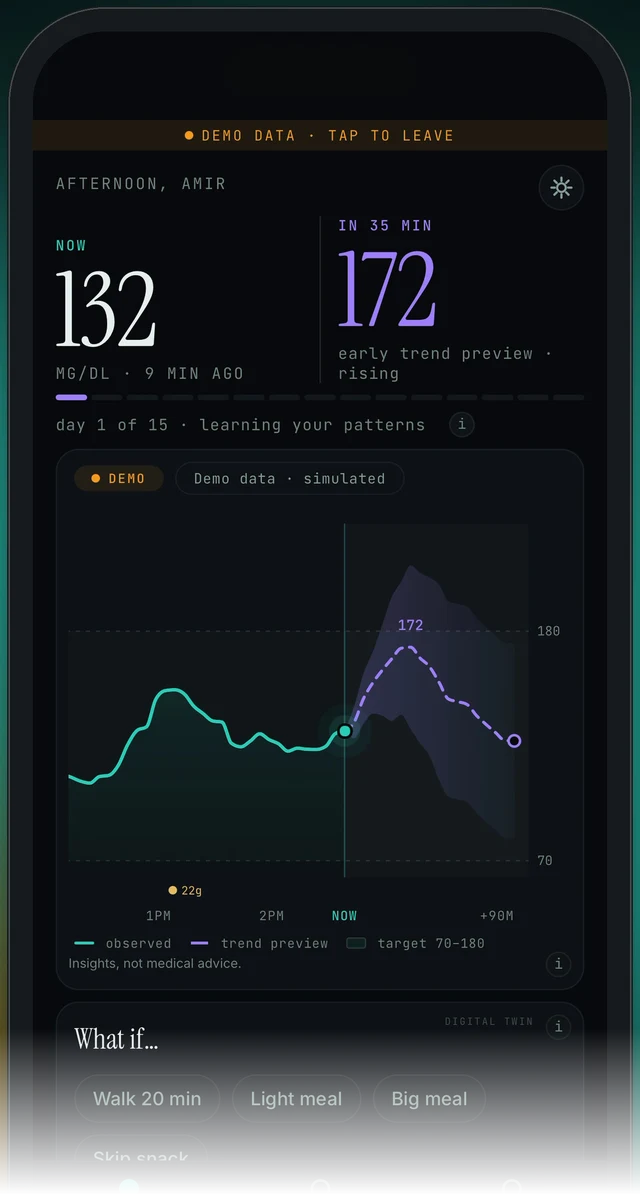
The Today screen (demo). Charts are labelled LIVE, REPLAY or DEMO; here the chip on the chart card reads DEMO. The syncing… text appears in the source chip while an upload runs.
Today → source chip · Today → top-right icon → Settings → Report a problem
- Wait a moment. The chip says syncing… only while an upload is running, and it changes back when the upload finishes.
- Check that your phone has an internet connection. The upload needs one.
- If it still says syncing… after a while, close the app and open it again, then look at the chip.
- If it stays on syncing…, go to Today → top-right icon → Settings → Report a problem and attach diagnostics so we can look. What the upload is and how consent works: Upload vs on-device.
Endobits is not allowed to read Glucose from Apple Health
Why. iPhone asks once. If Glucose was left off, or the prompt was dismissed, Endobits has no permission to read glucose from Apple Health. It then has nothing to show, even though Health is full of readings. The switch lives in the iPhone's own Settings app, not inside Endobits.
iPhone Settings → Privacy & Security → Health → Endobits → Glucose
- Open the iPhone Settings app (not Endobits).
- Go to Privacy & Security → Health → Endobits.
- Make sure Glucose is ON. Turn on anything else you want to share, like steps and sleep, if you want that context in Trends.
- Check that your sensor app is actually writing to Apple Health: open the Apple Health app → Browse → Blood Glucose. If there are no readings there, fix sharing in the sensor app first (next section, or the per-sensor steps on Connect your sensor). Endobits can only read what Health has.
- Go back to Endobits and give it time. Most sensors deliver to Apple Health with up to about 60 minutes of delay, and a brand-new sensor may need a few hours of warm-up before its first readings arrive. The result shows on Today, under NOW.
On Android the permission is granted through Health Connect instead: in Endobits, tap Care, scroll to Your data connection and use CONNECT on the Health Connect row. The Android steps and checks are on Connect Health Connect and Android troubleshooting.
Your sensor app is not writing to Apple Health at all
Why. Apple Health sharing is still off inside the sensor maker's app. Endobits can only read what Health has, so until the sensor app writes glucose to Health there is nothing to pick up. This is fixed in the sensor app, not in Endobits.
Apple Health app → Browse → Blood Glucose · Dexcom or Stelo app → Profile → Apple Health · Libre or Lingo app → Menu → Settings → Apple Health
- Open the Apple Health app → Browse → Blood Glucose. If it is empty, the problem is upstream of Endobits: your sensor's app is not writing to Health yet.
- Turn on Health sharing in your sensor's own app. Dexcom or Stelo app: Profile (Settings on some versions) → Apple Health → sharing ON. Eversense app: turn on Apple Health sharing in the app's settings. Libre or Lingo app: Menu → Settings (Connected Apps on some versions) → Apple Health → allow glucose to be shared (written) to Health. Full per-sensor steps: Connect your sensor.
- Wait. Readings usually reach Apple Health within about 60 minutes, and a brand-new sensor may need a few hours of warm-up before its first readings arrive. This delay is set by the sensor makers, not by Endobits.
- Check Health → Browse → Blood Glucose again. Once readings appear there, Endobits picks them up from Health.
- If Health has readings but Endobits still shows none, check that Endobits is allowed to read glucose: iPhone Settings → Privacy & Security → Health → Endobits → Glucose ON (previous section).
The age climbs toward an hour: the normal Apple Health delay
Why. Through Apple Health, readings arrive with up to about 60 minutes of delay. That delay is set by the sensor makers, not by Endobits, so the age under the NOW number is normally much older than in the sensor's own app. Some people report Dexcom running about three hours behind in Apple Health, so a longer gap is possible with some sensors.
Today → the age line under NOW · Apple Health app → Browse → Blood Glucose
- Read the small line under the NOW number (for example MG/DL · 9 MIN AGO). That is the age of the latest reading Endobits has. A growing number is not a fault by itself.
- Open the Apple Health app → Browse → Blood Glucose and look at the time of the newest reading. If Health is also an hour or so behind your sensor app, the delay is upstream, set by the sensor maker, and cannot be changed from inside Endobits.
- If Health has newer readings than Endobits, return to Endobits and give it a few minutes. Endobits picks readings up from Health; it cannot show what Health does not have yet.
- If the gap grows past a few hours, check that your sensor's app is still sharing to Apple Health (sensor app steps) and that iPhone Settings → Privacy & Security → Health → Endobits has Glucose switched ON.
- If you want fresher readings than Apple Health gives, there are two paths: the Dexcom direct connection (US Dexcom accounts), which runs a few minutes behind, under Care → Your data & reports → Your data connection → Dexcom API (Dexcom guide), or a DIY rig, which is real time, under Settings → Connections → DIY rig (DIY rig guide).
Data stopped after a sensor change, or during warm-up
Why. A brand-new sensor needs a few hours of warm-up before its first readings exist. After that, readings still take up to about 60 minutes to reach Apple Health. Direct connections refresh when the app launches, and on 5.1.2 and later also when it comes back to the foreground, so the app can sit on the last old reading until you reopen it.
Care → Your data & reports → Your data connection → Dexcom API · Today → top-right icon → Settings → Report a problem
- Check your sensor's own app first. A brand-new sensor may need a few hours of warm-up before its first readings exist. Until then there is nothing for Endobits to read.
- Once the sensor app shows readings, allow up to about 60 minutes for them to reach Apple Health. Confirm in the Apple Health app → Browse → Blood Glucose. If nothing is there, fix sharing in the sensor app (above). Endobits can only read what Health has.
- Reopen Endobits. Dexcom, Eversense and DIY rig connections refresh when the app launches (newer builds also refresh when the app returns to the foreground).
- If you use the Dexcom direct connection, tap Care at the bottom, scroll to Your data connection, and check that Dexcom API still shows as connected. If not, tap it and sign in again. The list is shown in the next section.
- If the age under NOW (for example 9 MIN AGO) keeps growing for several hours after the new sensor is live, open Today → top-right icon → Settings → Report a problem and attach diagnostics, or email contact@bioconscious.tech.
Dexcom API shows connected, but Today has no number or lags the Dexcom app
Why. Dexcom updates through the direct connection are not instant and can take a few minutes to catch up after connecting. The connection is refreshed when the app launches, and from 5.1.2 also when it returns to the foreground, so an app left in the background can look stale. A sensor in warm-up has no readings to send. The direct connection works with US Dexcom accounts only.

Bottom of every screen: tap Care, the right-hand tab.
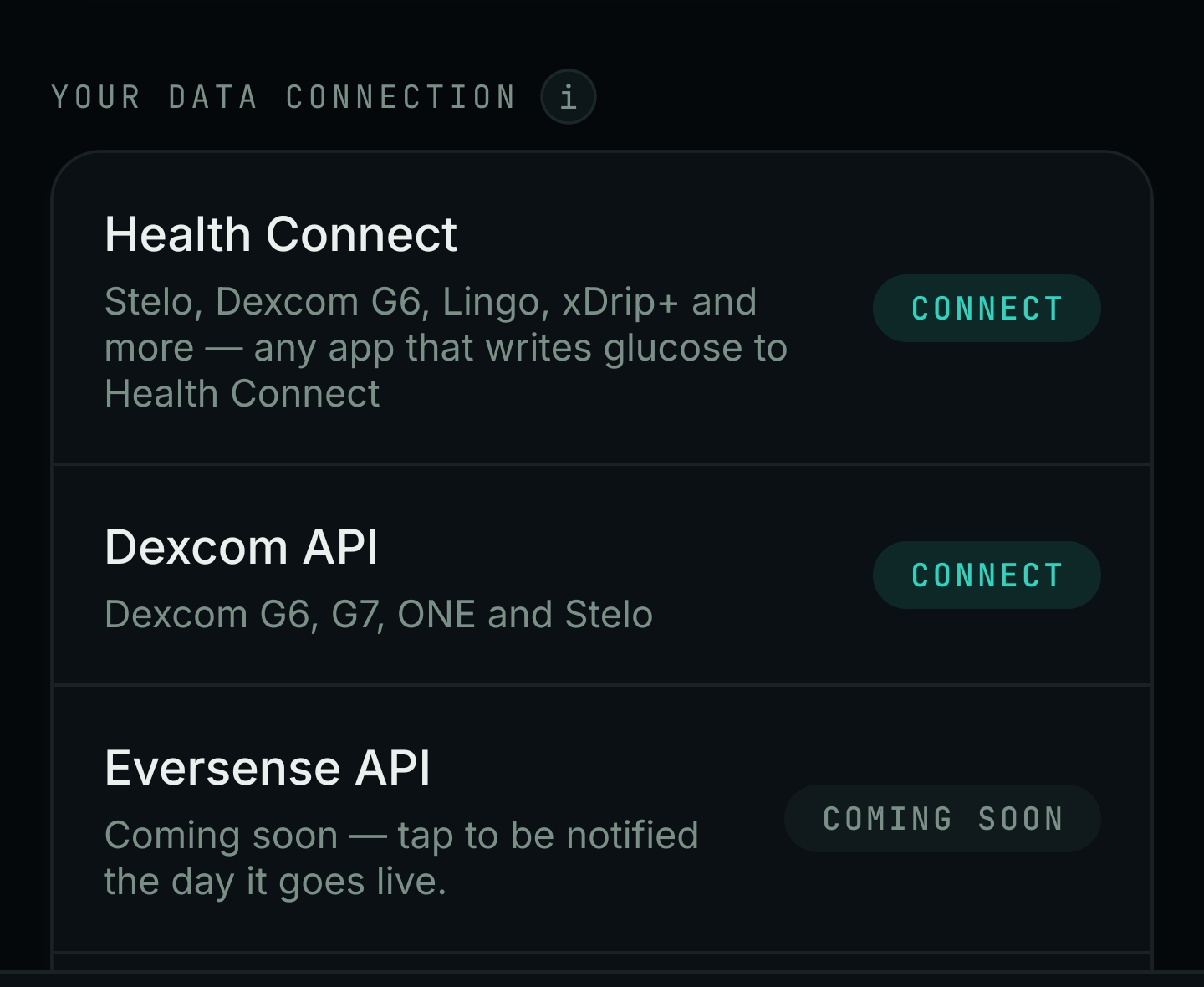
Care → Your data & reports, scrolled down to Your data connection. Dexcom API is the middle row.
Care → Your data & reports → Your data connection → Dexcom API
- Give it a few minutes. Dexcom updates are not instant and can take a few minutes to catch up after you connect.
- Close Endobits and open it again. The Dexcom connection refreshes when the app launches, and from 5.1.2 also when it comes back to the foreground.
- Check the age under NOW on Today (for example MG/DL · 9 MIN AGO). That tells you how old the reading Endobits has is.
- Make sure the Dexcom app itself is showing current readings. Endobits can only show what Dexcom has.
- Open Care → Your data connection and confirm Dexcom API still shows as connected. If it does not, tap it and sign in again with your Dexcom account, the same one you use in the Dexcom app. Full steps: Connecting Dexcom to Endobits.
- If it still looks off after a day, use Settings → Report a problem (attach diagnostics if you like), or email contact@bioconscious.tech or call +1 (236) 235-5295.
Eversense through Apple Health shows nothing, or readings are late
Why. Either Apple Health sharing is not actually on in the Eversense app, or Endobits lacks the Glucose read permission on the iPhone. Eversense data is not real time on either path, so some lag is expected. The Eversense API row in the Care tab still shows COMING SOON on iPhone, so Apple Health is the route today.
Eversense app → settings → Apple Health sharing · iPhone Settings → Privacy & Security → Health → Endobits → Glucose
- Open the Eversense app on your iPhone and turn on Apple Health sharing in its settings. Details: Connecting Eversense to Endobits.
- Open the Apple Health app → Browse → Blood Glucose and confirm Eversense readings are landing there. If none are there, the Eversense app is not writing to Health yet; fix that first. Endobits can only read what Health has.
- Confirm the iPhone permission: Settings → Privacy & Security → Health → Endobits → make sure Glucose is ON.
- Give it time. Most sensors deliver to Apple Health with up to about 60 minutes of delay, and a brand-new sensor may need a few hours of warm-up. Eversense data is not real time on either path.
- If it still looks off after a day, use Today → top-right icon → Settings → Report a problem (attach the diagnostics you choose), or email contact@bioconscious.tech with your sensor model and iPhone version.
Libre 3, Libre 2 or Lingo on iPhone: does it work yet?
Why. Libre and Lingo have no direct connection in the app, so there is no Libre row in the Care tab. The only route is the Libre or Lingo app writing glucose to Apple Health and Endobits reading it there. Our connect guide shows a Coming soon badge on that section while also giving Apple Health steps, so treat Libre and Lingo on iPhone as not yet confirmed. We are checking the current status.
Libre or Lingo app → Menu → Settings → Apple Health · iPhone Settings → Privacy & Security → Health → Endobits → Glucose
- Libre and Lingo do not have their own connection card in Endobits, so there is nothing to tap in the Care tab for them.
- In the Libre app (or Lingo app): Menu → Settings (on some versions it is called Connected Apps) → Apple Health → allow glucose to be shared (written) to Health.
- Open the Apple Health app → Browse → Blood Glucose and check that Libre or Lingo readings are there. If there are none, the sensor app is not writing to Health yet; Endobits can only read what Health has.
- On the iPhone: Settings → Privacy & Security → Health → Endobits → make sure Glucose is ON.
- Give it time: most sensors deliver to Apple Health with up to about 60 minutes of delay, and a brand-new sensor may need a few hours of warm-up.
- If nothing shows after that, use Settings → Report a problem in the app, or email contact@bioconscious.tech with your Libre or Lingo model and iPhone version. Libre and Lingo support on iPhone is marked Coming soon, so the team can confirm where it stands.
On Android, Lingo writes to Health Connect today and Libre does not yet. See Endobits Companion for Android and Connect Health Connect.
The number only updates when you force-quit and reopen the app
Why. Before version 5.1.2, the Dexcom, Eversense and DIY rig connections refreshed only at launch. From 5.1.2 they also refresh when the app returns to the foreground. As of the 1 October 2026 changelog, 5.1.2 was on TestFlight with App Store submission pending, and a preview build on Android, so App Store users may still be on 5.1.0 and Google Play users on 5.1.1.
Today → top-right icon → Settings
- Check which build you have: open Settings from the top-right icon on Today and look for the version number. Settings shows the build's real version.
- The foreground refresh for Dexcom, Eversense and DIY rig connections arrived in 5.1.2. Check the App Store or Google Play for an update. If 5.1.2 is not offered to you yet, the next step still works.
- On 5.1.2 or later, switching back to Endobits is enough to refresh a direct connection (Dexcom, Eversense, DIY rig). On older builds the connection refreshes only at launch, so fully close and reopen the app to pull fresh readings.
- The NOW number shows the reading's age underneath it (for example 9 MIN AGO). Use it to tell whether the reading is actually old.
- If you read glucose through Apple Health, we have not published a refresh schedule for it. If readings look old there, close and reopen the app and check that the sensor's own app is still writing to Apple Health (steps above).
- The app has no push notifications, home-screen widgets or Apple Watch yet; they are listed as planned. Keep your CGM's own alerts on and treat your meter and CGM as the reference. Insights, not medical advice. See Alerts, widgets and watch.
You deleted or stopped using your sensor's own app
Why. Endobits does not replace the sensor's app. On iPhone it reads glucose from Apple Health, which the sensor's own app writes. On Android it reads Health Connect or a direct Dexcom link. Remove or silence the sensor app and Endobits has nothing to read. You also lose the sensor's alarms, which Endobits does not provide.
Care → Your data & reports → Your data connection · Settings → Connections → DIY rig
- Keep your sensor's own app (Dexcom, Stelo, Libre, Lingo or Eversense) installed. It is the app that receives readings from the sensor and writes them to Apple Health (iPhone) or Health Connect (Android). Endobits can only read what Health has, and it does not sound alarms; follow your sensor app's own alerts and your meter.
- Make sure that app is writing to Apple Health (iPhone) or Health Connect (Android). The per-sensor steps are on Connect your sensor. On iPhone, confirm by opening Apple Health → Browse → Blood Glucose; if there are no readings there, fix it in the sensor app first.
- If you use a direct connection instead, open the Care tab and look under YOUR DATA CONNECTION (Health Connect, Dexcom API, Eversense API; the list is shown above). Tap CONNECT on the one you use and sign in again if asked. A DIY rig is connected from Settings → Connections → DIY rig.
- Allow for the normal delay: readings through Apple Health usually arrive up to about 60 minutes behind the sensor, and through Health Connect about three hours behind. A DIY rig is the only real-time path. A brand-new sensor may also need a few hours of warm-up.
Frequently asked
- Why is the NOW number different from the number in my Dexcom or sensor app?
- NOW is the latest reading that reached Endobits, and the line under it tells you how old that reading is. Readings through Apple Health can be up to about an hour behind the sensor, and through Health Connect on Android about three hours. If you just calibrated (version 5.1.2 and later), NOW shows your meter value until the next sensor reading arrives. More: Calibration.
- Why is Endobits behind my Dexcom or Libre app?
- Through Apple Health, most sensors deliver with up to about 60 minutes of delay, set by the sensor makers, not Endobits. The age line under the NOW number (for example MG/DL · 9 MIN AGO) tells you how old the latest reading is. Direct Dexcom can be a few minutes behind. A DIY rig is real time.
- Will Endobits warn me if my sensor stops sending data?
- No. Push notifications, home-screen widgets and Apple Watch are listed as planned for 5.2 and are not in the app yet. Keep your CGM's own alerts on and check the age line under NOW when you open the app.
Still stuck? We answer.
A person at Bio-Conscious reads every message. Tell us your phone model, your sensor, and what you see on the screen.
Real app screens · demo data. Endobits shows insights, not medical advice. Always follow your care team's guidance and your sensor's own alerts for treatment decisions.
More help: All support articles · Connect your sensor · Set up Endobits Companion