Connect your DIY rig
If you run your own self-hosted glucose site, Endobits can read it directly. It is the only real-time path, with no Apple Health or Health Connect delay.
Why connect a DIY rig
A DIY rig is your own self-hosted glucose site: a site you run that relays your sensor's readings. Endobits reads it directly, so readings arrive in real time. Every other route has a delay built in. Apple Health readings arrive up to about 60 minutes behind the sensor, and readings that reach Health Connect on Android arrive about three hours behind. Those delays are set by the sensor makers, not by Endobits.
The delay matters because the forecast starts from your latest reading. The Today screen shows NOW beside a 60-minute forecast, with the age of the reading underneath. With a DIY rig that reading is current, so the live forecasting features that a 60-minute delay cannot power work as designed. All routes side by side: Connect your sensor.
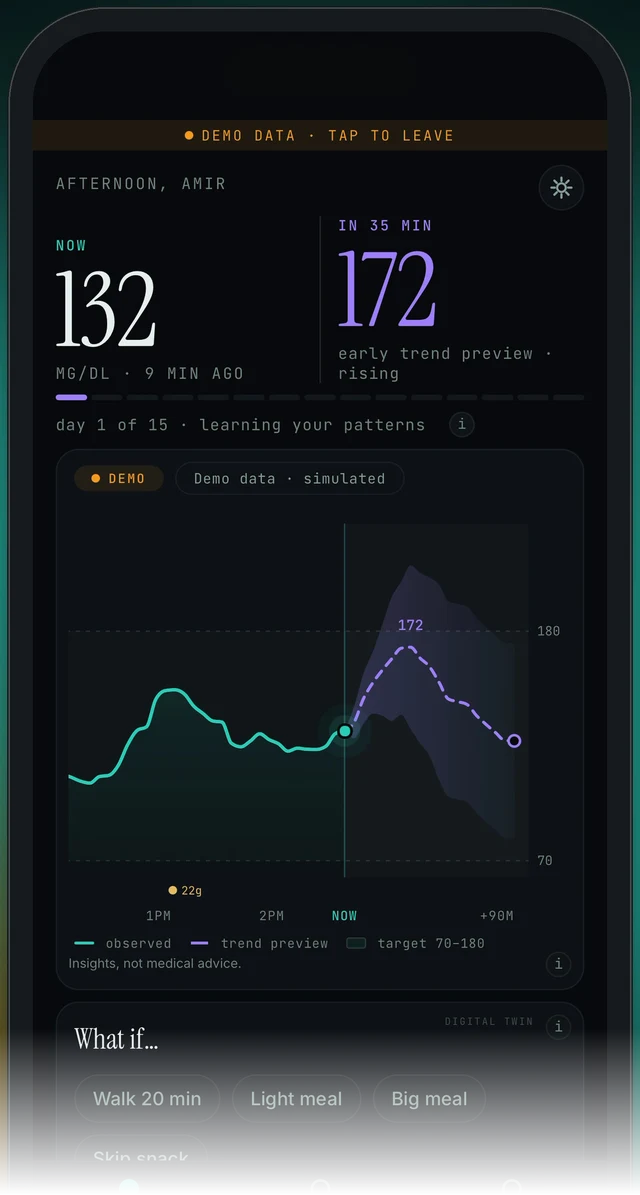
Today screen (demo data). NOW on the left, the 60-minute forecast on the right. The age under NOW tells you how fresh the latest reading is.
Connect it: Settings → Connections → DIY rig
You need two things from your site: its URL and an access token with read permission. If someone else hosts the site for you, ask them for both.

Today screen, top-right corner: this icon opens Settings. Connections, and the DIY rig entry, are inside Settings.
Today → top-right icon → Settings → Connections → DIY rig
- On the Today screen, tap the icon in the top-right corner to open Settings.
- Go to Connections → DIY rig.
- Enter your rig's URL, like https://yourname.example.com: the full https address of your site, with nothing after it.
- Enter an access token with read permission. Copy and paste it rather than typing it.
- Endobits verifies the connection and starts reading immediately.
- Go back to Today. The age under NOW (9 MIN AGO on the demo) shows how fresh the latest reading is.
From version 5.1.2, the DIY rig connection also refreshes whenever Endobits returns to the foreground, not only at launch. On an older build, fully close and reopen the app to refresh. Install any update the App Store or Google Play offers.
The connection will not verify: the URL is wrong or missing https://
Why. Endobits verifies the connection as you enter it, so a bad address fails right there. The address has to be the full https address of your site, like https://yourname.example.com, with nothing after it. The usual slips: http instead of https, a missing or extra character, a space at the end, or a page path pasted after the domain.
Today → top-right icon → Settings → Connections → DIY rig
- Open your site in the browser on the same phone. If it does not load there, fix the site or the address first. Endobits cannot reach a site your phone cannot reach.
- Copy the address from the browser's address bar, so you get the exact spelling and the https:// prefix.
- In Endobits, open Settings → Connections → DIY rig and paste it. Remove anything after the domain name, and any space at the end.
- Enter the token again and let Endobits verify the connection.
- Still rejected? Use Settings → Report a problem and say it is a DIY rig connection, or email contact@bioconscious.tech. Include the address, never the token.
The connection will not verify: the token has no read permission
Why. Endobits needs an access token with read permission on your rig. A token created without read permission, one that was mistyped, or one that has since been changed or removed on the site will not work. A token is long and case sensitive, so typing it by hand is the most common mistake.
Today → top-right icon → Settings → Connections → DIY rig
- On your site, check the token you used, or make a new one. It needs read permission. Nothing in the Endobits setup asks for more than that.
- Copy the whole token and paste it into Endobits under Settings → Connections → DIY rig. Do not type it.
- Let Endobits verify the connection. It starts reading as soon as the check passes.
- Still stuck? Settings → Report a problem (attach the diagnostics you choose), or call +1 (236) 235-5295. Never paste a token into an email or a support message.
Readings were arriving, now nothing: the site is down or unreachable from the phone
Why. Endobits reads your site over the internet, from your phone. If the site is down, its hosting is paused, or the phone has no route to it (no mobile data, or a network that blocks it), there is nothing to read. Endobits can only read what your site serves, and your site can only serve what your sensor sends it.
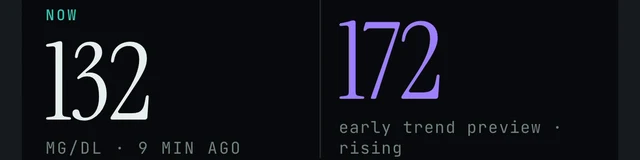
Today screen, under NOW: the age of the latest reading. If it keeps growing, nothing new is reaching Endobits.
Today → NOW → age of the reading · Settings → Connections → DIY rig
- Open your site in the browser on the phone. If it does not load, the problem is on the site or the network, not in Endobits.
- If the site loads, check that it shows a recent reading itself. If the site is stale, whatever sends your sensor readings to it has stopped. Fix that first.
- Bring Endobits back to the foreground. From 5.1.2 the connection refreshes on return. On an older build, fully close and reopen the app.
- If the site is current and Endobits still shows old readings, re-enter the connection under Settings → Connections → DIY rig.
- Not updating from any source? See No data, or not updating.
Readings stop after a sensor change
Why. Two different things look the same. A brand-new sensor may need a few hours of warm-up before its first readings arrive, so for a while your site has nothing new to relay, and neither does Endobits. The other case is the app itself: before version 5.1.2 the DIY rig connection refreshed only at launch, so an app left open on the old sensor's readings stayed there.
Today → NOW → age of the reading · Settings → Connections → DIY rig
- Wait out the warm-up. Check on your site, not in Endobits, whether new readings are arriving at all.
- Once the site is current, bring Endobits to the foreground, or fully close and reopen it. Then check the age under NOW.
- Still on the old readings after the site has been current for a while? Re-enter the connection under Settings → Connections → DIY rig.
- Install any update the App Store or Google Play offers. The foreground refresh for DIY rig connections arrived in 5.1.2.
- Still stuck? Settings → Report a problem, or email contact@bioconscious.tech with your sensor model and your phone model.
During a gap, your sensor's own app and its alerts stay the reference. Endobits shows insights, not medical advice.
On Android: Health Connect, and sensors that do not write to it yet
On Android, Endobits also reads the glucose your sensor app writes to Health Connect. Today Dexcom G6, Stelo and Lingo write to it. Readings that reach Health Connect arrive about three hours behind the sensor, and Endobits syncs them in the background every 15 minutes once Health Connect is connected. Steps: Connect Health Connect.
Some sensors don't write to Health Connect yet. For those, people use xDrip+, a community-built app that reads the sensor and writes glucose to Health Connect. Endobits then reads it from there. On Android with a Dexcom G7 or a FreeStyle Libre, you may need it.
xDrip+ is made and supported by volunteers, not by Bio-Conscious or your sensor maker. Install it from its GitHub releases page, not the Play Store, and follow its own guide: the xDrip+ guide and xDrip+ releases on GitHub. xDrip+ alarms and calibrations are its own business. Your sensor's app and your meter stay the reference.
Care → Your data connection → Health Connect → Connect
- In xDrip+, turn on Health Connect writing.
- In Endobits go to Care → Your data connection → Health Connect → Connect.
Readings through Health Connect arrive about three hours behind the sensor, whichever app writes them. So xDrip+ can be the source feeding Health Connect while your DIY rig stays the real-time path, if your Android build offers that connection: the Android page lists Health Connect and the direct Dexcom link today. More: Endobits Companion for Android and Android troubleshooting.
Frequently asked
- What counts as a DIY rig?
- Your own self-hosted glucose site: a site you run (or someone runs for you) that relays your sensor's readings. Endobits connects to it with the site's URL and an access token with read permission, under Settings → Connections → DIY rig. If a friend or family member hosts the site, ask them for the URL and a read token.
- How fresh are the readings through a DIY rig?
- Real time. This is the only route without a built-in delay. Apple Health readings arrive up to about 60 minutes behind the sensor, and readings through Health Connect on Android about three hours behind. On the Today screen, the age under NOW shows how old the latest reading is.
- Do I still need Apple Health or Health Connect if my rig is connected?
- Not for glucose. Apple Health also carries meals, activity, sleep and workouts (read-only), which the Trends tab uses as context, so you may want it connected for that. We have not documented what happens when a rig and another glucose source are both connected, so if readings look odd with both on, mention it in Settings → Report a problem.
- Does the token need write permission?
- The setup asks for a token with read permission, and that is all it asks for. Use a read token, keep it to yourself, and never paste it into an email or a support message. If you ever replace the token on your site, update it in Endobits under Settings → Connections → DIY rig.
- Will Endobits warn me when my rig stops sending?
- Not yet. Push notifications, home-screen widgets and Apple Watch are planned and not in the app today. The tell is the age under NOW on the Today screen. Your sensor's own app and its alerts stay the reference for anything urgent.
Still stuck? We answer.
A person at Bio-Conscious reads every message. Tell us your phone model, your sensor, and what you see on the screen.
Real app screens · demo data. Endobits shows insights, not medical advice. Always follow your care team's guidance and your sensor's own alerts for treatment decisions.
More help: All support articles · Connect your sensor · Set up Endobits Companion