Endobits on Android: Health Connect, delays and sync
Android-only problems: Health Connect connected but empty, Dexcom G7 and FreeStyle Libre not writing to Health Connect yet, readings about three hours behind, background sync stopping, and the keyboard and back-button bugs in older builds.
On Android, Endobits Companion reads glucose two ways: from Health Connect, Android's health data store, where your sensor app writes its readings, or through a direct Dexcom link (US Dexcom accounts only). Both live in the Care tab under Your data connection. Setting them up for the first time is covered in Connect Health Connect and Connecting Dexcom to Endobits. This page is for when that is done and something still looks wrong. On iPhone instead? See No data or not updating.
Health Connect is connected but nothing shows up
Why. Three causes cover most cases. Your sensor app may not write glucose to Health Connect yet: the Dexcom G7 and FreeStyle Libre apps do not. The readings may not have reached Health Connect yet: they arrive about three hours behind the sensor, and Endobits then syncs every 15 minutes. Or you are still in the demo, or not signed in: live data needs an account.

Bottom of every screen: tap Care, the third tab, to reach Your data & reports.
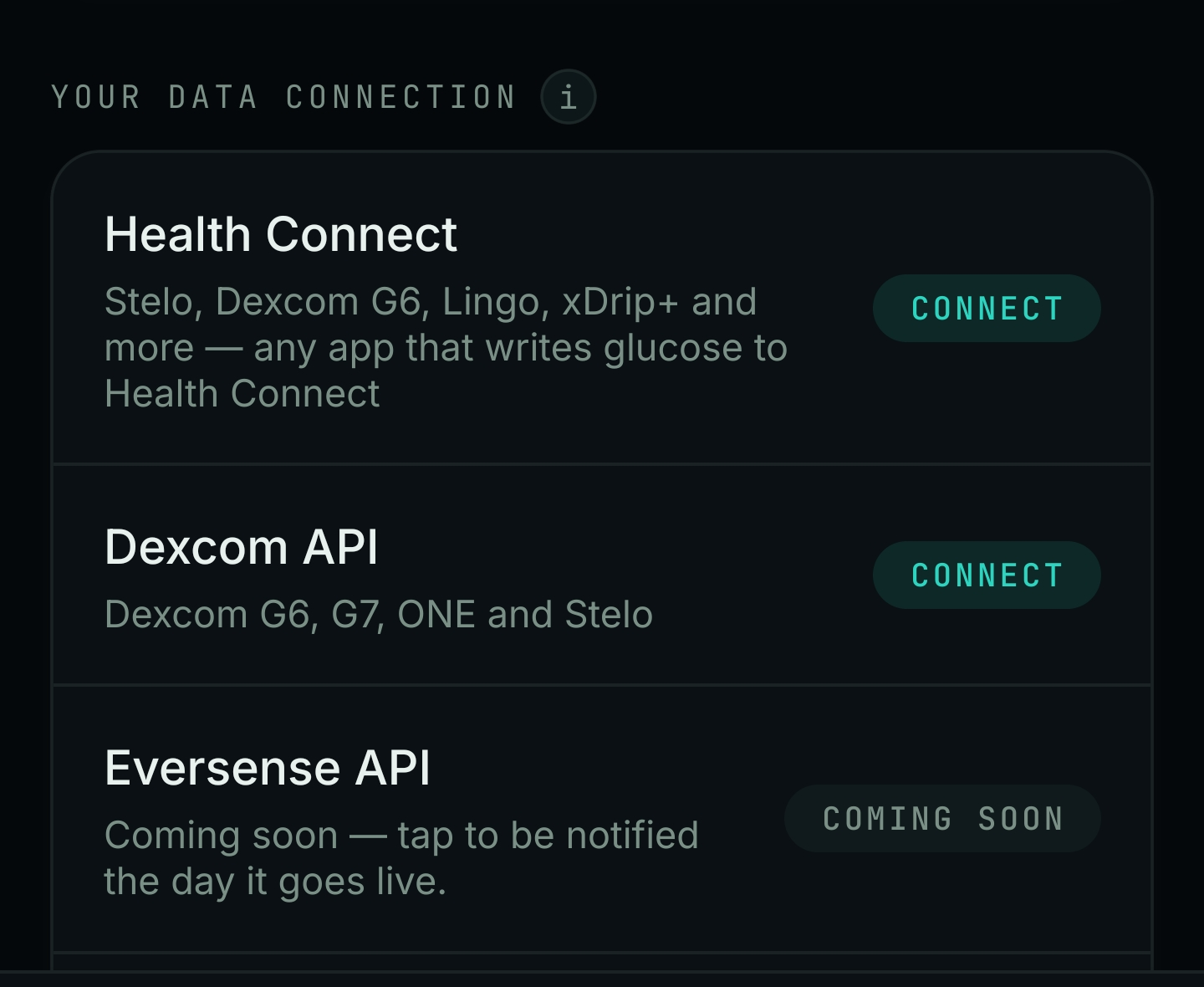
Care tab, scrolled down to Your data connection. The Health Connect row is where Android readings come in; Dexcom API is the direct link; Eversense API shows Coming soon.
Care (bottom tab) → Your data & reports → Your data connection → Health Connect → Connect
- Check that your sensor app writes glucose to Health Connect today. The Dexcom G6, Stelo and Lingo apps do. The Dexcom G7 and FreeStyle Libre apps do not write to Health Connect yet: for those, read Dexcom G7 or FreeStyle Libre below. The Health Connect row in the app says it reads "any app that writes glucose to Health Connect". Endobits can only read what is already there.
- Make sure sharing to Health Connect is switched on inside your sensor app. Where that switch lives differs from app to app, so follow your sensor app's own guide.
- Make sure you are signed in to an Endobits account. The demo needs no account, but live data does. If the top of Today shows the amber DEMO DATA · TAP TO LEAVE banner, tap it to leave the demo. More in Demo vs live.
- Give it time. Readings that reach Health Connect arrive about three hours behind your sensor. Once Health Connect is connected, Endobits syncs in the background every 15 minutes. See Readings are about three hours old.
- Go back to Care → Your data connection and look at the Health Connect row. If it still offers Connect, tap it again and finish the connection.
- Still nothing after about four hours: open Today → top-right icon → Settings → Report a problem, attach the diagnostics you choose, and tell us your sensor model and Android version. Or email contact@bioconscious.tech or call +1 (236) 235-5295.

Top of the Today screen (demo shown). The amber DEMO DATA · TAP TO LEAVE banner appears only in the demo; tap it to leave (step 3). The icon in the top-right corner opens Settings, which shows your app version and, from 5.1.2, holds Report a problem (step 6).
Readings are about three hours old
Why. Nothing is broken. On Android, readings that go through Health Connect arrive about three hours behind the sensor. Your sensor app decides when it writes to Health Connect, and Endobits can only read what is there. The line under the NOW number shows the age of the newest reading Endobits has.
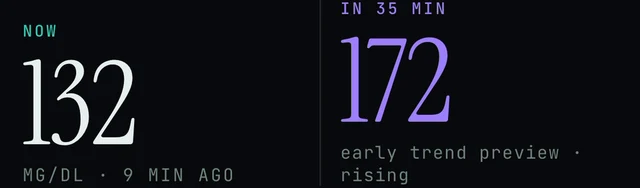
Today screen (demo data). The small line under the NOW number, here 9 MIN AGO, is the age of the newest reading Endobits has. On the Health Connect path, expect it to read hours rather than minutes.
Today → under the NOW number · Care → Your data connection → Dexcom API
- Expect a delay of about three hours on the Health Connect path. The age under NOW is the age of the newest reading Endobits has, not the age of your sensor's latest reading.
- Endobits syncs in the background every 15 minutes once Health Connect is connected. A reading that is already hours old when it reaches Health Connect still shows as hours old in Endobits. Sync is doing its job; the delay happens before the reading reaches Health Connect.
- If you have a US Dexcom account, you can connect Dexcom directly instead. The direct link does not go through Health Connect: Care → Your data connection → Dexcom API → CONNECT, then sign in with your Dexcom account. Dexcom updates are not instant either; it can take a few minutes to catch up after you connect. Details: Connecting Dexcom to Endobits.
- For decisions right now, use your sensor's own app and its alerts, not an Endobits reading that is hours old. Endobits shows insights, not medical advice.
- If the age keeps growing well past the usual delay and never resets, check that your sensor app is still writing to Health Connect, then read Background sync stops. If it still looks wrong, use Settings → Report a problem.
Dexcom G7 or FreeStyle Libre: Health Connect has nothing to read
Why. The Dexcom G7 app and the FreeStyle Libre app do not write glucose to Health Connect yet, so there is nothing for Endobits to read there. This is a limit of those sensor apps, not of Endobits. Endobits reads any app that writes glucose to Health Connect, so the fix is either the direct Dexcom link, where it applies, or another app that writes your glucose to Health Connect.
Care (bottom tab) → Your data connection → Dexcom API → CONNECT
- Dexcom G7 with a US Dexcom account: use the direct link, which does not go through Health Connect. Tap Care, scroll to Your data connection, tap Dexcom API → CONNECT, sign in with your Dexcom account (the same one you use in the Dexcom app) and approve the connection. Dexcom API then shows as connected in the same list. The row covers Dexcom G6, G7, ONE and Stelo. Details: Connecting Dexcom to Endobits.
- Dexcom G7 outside the US: the direct link works with US Dexcom accounts only, and the G7 app does not write to Health Connect yet. The route below is the one left today. We keep Endobits Companion for Android updated as this changes.
- FreeStyle Libre on Android: the Libre app does not write to Health Connect yet, and the direct link is Dexcom only. The route below is the one left today. On iPhone, Libre works through Apple Health: Connect your sensor.
Sensor apps that write glucose to Health Connect today:
- Dexcom G6
- Stelo
- Lingo
Some sensors don't write to Health Connect yet. For those, people use xDrip+, a community-built app that reads the sensor and writes glucose to Health Connect. Endobits then reads it from there. xDrip+ is made and supported by volunteers, not by Bio-Conscious or your sensor maker. Install it from its GitHub releases page, not the Play Store, and follow its own guide. If you wear a Dexcom G7 or a FreeStyle Libre, you may need it. Links: the xDrip+ guide and xDrip+ releases on GitHub. Its alarms and calibrations are its own business; your sensor's app and your meter stay the reference.
Care (bottom tab) → Your data connection → Health Connect → Connect
- In xDrip+, turn on Health Connect writing.
- In Endobits, go to Care → Your data connection → Health Connect → Connect.
- Readings still come in through Health Connect, so expect a delay (see Readings are about three hours old) and a background sync every 15 minutes.
- Still stuck: Settings → Report a problem with the diagnostics you choose, or contact us.
Tapping Connect does nothing, or the phone says Health Connect is not available
Why. We have not pinned this one down yet, so treat the steps below as a checklist. Health Connect is Android's health data store, not part of Endobits. A message that Health Connect itself needs installing or updating comes from your phone, and Endobits cannot connect until that is done. Endobits Companion needs Android 8.0 or later.
Care (bottom tab) → Your data connection → Health Connect → CONNECT
- Check that your phone runs Android 8.0 or later. Endobits Companion for Android needs it. Store and install questions: Can't install the app.
- If your phone shows a message about Health Connect itself, such as not installed or needs an update, deal with that message first, then come back to Endobits.
- Check that your sensor app writes glucose to Health Connect. Dexcom G6, Stelo and Lingo do today. Dexcom G7 and FreeStyle Libre do not yet, so there would be nothing to read even once connected (see above).
- In Endobits, tap Care at the bottom, scroll to Your data connection, tap CONNECT next to Health Connect, and finish the connection.
- Give it time. Once Health Connect is connected, Endobits syncs in the background every 15 minutes, and readings that reach Health Connect arrive about three hours behind your sensor.
- Still stuck: Today → top-right icon → Settings → Report a problem, attach the diagnostics you choose, and mention your phone model and Android version. Or contact us.
Background sync stops: readings only update when I open the app
Why. Once Health Connect is connected, Endobits syncs in the background every 15 minutes. Android can stop that scheduled work if the app is force-stopped or if your phone restricts the app in the background. Version 5.1.1, the first Google Play release, fixed background sync not surviving the app being stopped by the system, so a build from before the store release can also cause this.
Today → top-right icon → Settings · Care → Your data connection → Health Connect
- Update Endobits from Google Play, then check your build: Today → top-right icon → Settings. Settings shows the build's real version. (The icon is in the Today screen figure above.)
- Check that Health Connect is still connected: Care → Your data connection → Health Connect. The 15-minute background sync runs only while Health Connect is connected.
- Remember the Health Connect path runs about three hours behind the sensor, so some age under the NOW number is normal even when sync is working (above).
- If your phone has stopped the app, opening Endobits brings it back and readings catch up. If this keeps happening, your phone may be stopping the app in the background. The phone setting that controls this is not covered here; ask us and we will walk you through it for your phone model.
- If sync still stalls, open Today → top-right icon → Settings → Report a problem and attach diagnostics, so we can see what the phone did. More on syncing: Data not syncing.
Demo meals and demo context show up next to my real readings
Why. This was a bug in the first Android release, 5.1.1: demo meals and demo context could appear next to real readings. Version 5.1.2 fixes it. At the time of writing, 5.1.2 on Android was a preview build, so Google Play may still have 5.1.1.
Today → top-right icon → Settings (app version) · Settings → Report a problem (5.1.2 and later)
- Check that you are not in the demo. In the demo an amber DEMO DATA · TAP TO LEAVE banner sits at the top of Today, and the chart card shows a DEMO chip with "Demo data · simulated". If you see those, tap the banner to leave the demo (figure above, and Demo vs live).
- Open Settings (the icon in the top-right corner of Today) and look for the app version. Since 5.1.1, Settings shows the build's real version.
- If the version is 5.1.1 or earlier, this is the known bug. Update Endobits Companion from Google Play when 5.1.2 is offered there.
- If you already have 5.1.2 and still see meal dots or other context you did not log next to live readings, open Settings → Report a problem and attach the diagnostics you choose, so we can look at the chart data. On 5.1.1 there is no Report a problem option yet; email contact@bioconscious.tech or call +1 (236) 235-5295 instead.
- Until you have the update, ignore meal dots you did not create and rely on your CGM's own display and alerts. Insights, not medical advice. How the chart's dots and lines are meant to read: Reading the chart.
The keyboard covers the text box, or the back button does nothing
Why. Both are Android bugs in the first Google Play release, 5.1.1. Version 5.1.2 fixes text fields hiding behind the keyboard (Settings, Your Link, Report a problem, sign-in) and makes the system back work in sign-in and onboarding. At the time of writing, 5.1.2 on Android was a preview build, so Google Play may still have 5.1.1.
Today → top-right icon → Settings (version) · First screen → Create account · Sign in · Explore the demo
- Check which version you have: Today → top-right icon → Settings. Settings shows the build's real version.
- If you are on 5.1.1, update Endobits from Google Play once 5.1.2 is available there. The store listing shows which version Google Play has now.
- Keyboard: if you cannot finish signing in or cannot type in Settings, email contact@bioconscious.tech or call +1 (236) 235-5295, and say which screen it happens on and your version from Settings. Sign-in help: Signing in, your account and your data.
- Back button: on the sign-in screen use the on-screen buttons instead of the back gesture: Create account, Sign in or Explore the demo.
- If either problem continues after updating, send a report from Settings → Report a problem and attach the diagnostics you choose. Report a problem arrived in 5.1.2, so it is not on the 5.1.1 build; email or call instead.
Eversense API says Coming soon
Why. Expected, not an error. Eversense on Android is coming soon. The row is already in the list so you can ask to be told the day it goes live.
Care (bottom tab) → Your data connection → Eversense API
- Tap the Eversense API row. It reads "Coming soon, tap to be notified the day it goes live." (The row is in the figure above.)
- Check back from time to time. Which connections the app offers can change on our side, so Eversense may switch on without you installing an update.
- Until then, the routes into Endobits on Android are apps that write glucose to Health Connect (Dexcom G6, Stelo, Lingo and similar) and the direct Dexcom link. We cannot point you to a Health Connect route for Eversense yet.
- On iPhone, Eversense works today through Apple Health: Connecting Eversense to Endobits.
- Still stuck: Settings → Report a problem, or contact us.
FAQ
- Which sensors work with Endobits Companion on Android?
- Two paths. Health Connect: any app that writes glucose to Health Connect. Today that is Dexcom G6, Stelo and Lingo (the in-app row also lists xDrip+). Dexcom G7 and FreeStyle Libre do not write to Health Connect yet. Direct Dexcom link: Dexcom G6, G7, ONE and Stelo through Dexcom API in the Care tab, US Dexcom accounts only. Eversense on Android is coming soon. Sensor by sensor: Connect your sensor.
- Why are my readings about three hours behind my sensor?
- Readings that go through Health Connect arrive about three hours behind the sensor. Your sensor's app decides when it writes to Health Connect, and Endobits can only read what is there. For decisions right now, use your sensor's own app and alerts. The direct Dexcom link (US accounts) does not go through Health Connect.
- How often does Endobits sync on Android? Do I have to keep the app open?
- No. Once Health Connect is connected, Endobits syncs in the background every 15 minutes. Since 5.1.1 that survives the app being stopped by the system. If you force-stop the app, or your phone restricts it in the background, sync can still pause; opening the app refreshes it.
- Do I need an account to use the Android app?
- Not for the demo. Tap Explore the demo on the first screen and use the whole app on simulated data. Live data from your sensor needs an account: Create account or Sign in.
- Can I use xDrip+ with Endobits on Android?
- The Health Connect row in the app lists xDrip+ among the apps that write glucose to Health Connect. If your xDrip+ writes glucose to Health Connect, Endobits can read it from there. Readings still come through Health Connect, so expect a delay that depends on your setup. Setting up xDrip+ itself is outside what Endobits support covers; see the note under Dexcom G7 or FreeStyle Libre.
- What Android version do I need, and is the Android app the same as the iPhone app?
- Android 8.0 or later, on phones and tablets. You get the same forecast, Trends and 14-day report as on iPhone. The differences today: no home-screen widgets on Android yet, Eversense on Android is coming soon, and Android reads glucose through Health Connect or a direct Dexcom link instead of Apple Health.
- Why does my connection list say Health Connect and not Apple Health?
- Health Connect is Android's health data store, so that row appears on Android phones. On iPhone, Endobits reads glucose, meals, activity, sleep and workouts from Apple Health instead; see Connect Apple Health. The screenshot of the list on this page is from Android.
Still stuck? We answer.
A person at Bio-Conscious reads every message. Tell us your phone model, your sensor, and what you see on the screen.
Real app screens · demo data. Endobits shows insights, not medical advice. Always follow your care team's guidance and your sensor's own alerts for treatment decisions.
More help: All support articles · Connect your sensor · Set up Endobits Companion