Connect Apple Health on iPhone
On iPhone, Endobits reads glucose from Apple Health, which your sensor's own app fills. Two switches make it work: sharing ON in the sensor app, and Glucose allowed for Endobits in iPhone Settings.
How it works
Why. On iPhone, Endobits does not talk to your sensor. Your sensor's own app (Dexcom, Stelo, Libre, Lingo or Eversense) writes each reading to Apple Health, and Endobits reads it from there. You do not pair the sensor with Endobits. The connection is two switches: one in the sensor app, one in iPhone Settings. Endobits only reads from Apple Health. It reads glucose, plus meals, activity, sleep and workouts if you allow them, and it never writes to Health. Most sensor apps hand readings to Apple Health with up to about 60 minutes of delay, so a reading age of up to about an hour under NOW is normal on this path.
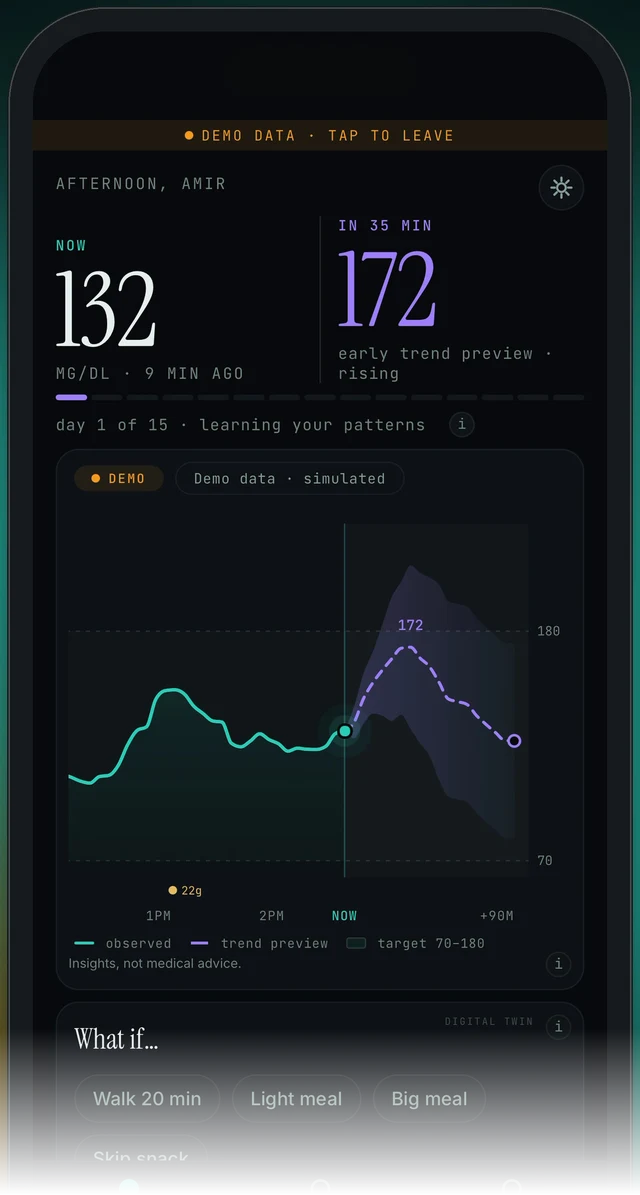
The Today screen (demo data). The line under the NOW number shows the unit and how old the latest reading is.
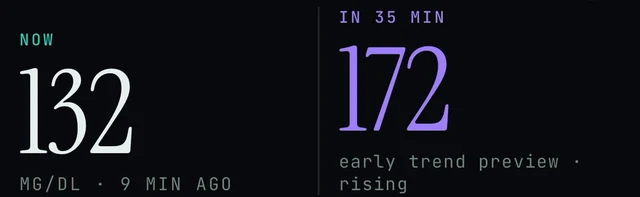
Today screen, under NOW: the unit and the age of the latest reading. Watch this line to see whether new readings are arriving.
Sensor app → Apple Health → ON · iPhone Settings → Privacy & Security → Health → Endobits → Glucose
- Turn on Apple Health sharing in your sensor's app (step 1).
- Allow Endobits to read Glucose in iPhone Settings (step 2).
- Confirm that the Apple Health app itself holds readings (step 3).
- In Endobits, sign in and leave the demo. Live readings need an account; the demo does not. Then allow up to about 60 minutes for the first readings to arrive.
1. Turn on Apple Health sharing in the sensor app
Why. Nothing reaches Apple Health until the sensor's own app is told to share. Each maker puts the switch in a slightly different place. Endobits can only read what Health has.
- Dexcom or Stelo: Dexcom app (or Stelo app) → Profile → Apple Health → ON. On some versions the menu is called Settings instead of Profile. Details and Dexcom's own guide: Dexcom on Connect your sensor.
- FreeStyle Libre or Lingo: Libre app (or Lingo app) → Menu → Settings → Apple Health, then allow glucose to be shared (written) to Health. On some versions the item is called Connected Apps. Details, Abbott's support hub and the current status of this path: Libre and Lingo on Connect your sensor.
- Eversense (365, E3): open the Eversense app and turn on Apple Health sharing in its settings. Details: Eversense on Connect your sensor.
- Then move on to step 2. The first readings can take up to about 60 minutes to reach Health, and a brand-new sensor may need a few hours of warm-up before its first reading.
2. Allow Endobits to read Glucose in iPhone Settings
Why. Apple Health shares each type of data with each app only when you allow it. If Glucose is off for Endobits, Health holds the readings and Endobits cannot see them. This permission lives in the iPhone Settings app, not inside Endobits.

Today screen, top: the demo banner and, top-right, the icon that opens Endobits' own Settings. The Health permission is not in there; it is in the iPhone Settings app.
iPhone Settings → Privacy & Security → Health → Endobits
- Open the iPhone Settings app (not the Settings inside Endobits).
- Tap Privacy & Security, then Health.
- Tap Endobits in the list of apps.
- Turn Glucose ON. Anything else you want Endobits to use, such as steps, sleep and workouts, is optional; it adds context in the Trends tab.
- If Endobits is not in that list, Health has not yet been asked to share with it on this phone. Open Endobits, sign in and leave the demo, then look again. If it is still missing, tell us through the contact block below and mention your iOS version.
- Go back to Endobits. Tap the DEMO DATA · TAP TO LEAVE banner if it is showing, sign in, and allow up to about 60 minutes.
3. Check that Apple Health has readings
Why. Apple Health sits between the two apps, so it tells you which half is stuck. If Health has fresh readings, the sensor app is doing its job and the problem is on the Endobits side: permission, demo, or time. If Health is empty, the sensor app is not writing yet.
Apple Health app → Browse → Blood Glucose
- Open the Apple Health app on your iPhone.
- Tap Browse, then Blood Glucose.
- Look at the time of the newest reading. Readings from the sensor app usually appear here with up to about 60 minutes of delay.
- No readings at all: go back to step 1. The sensor app is not writing to Health yet.
- Readings are there but Endobits shows none: check step 2, then the checks under Nothing showing.
Nothing showing in Endobits, or the reading never updates
Why. Five things cover almost every case: the Glucose permission, the sensor app not writing, the delay built into Apple Health delivery, the app still being in the demo, and the app needing to come back to the foreground to refresh.

Chart card on Today, top-left: the DEMO chip and the "Demo data · simulated" label. Every chart is labelled LIVE, REPLAY or DEMO, so with your own readings this reads LIVE.
- Permission. iPhone Settings → Privacy & Security → Health → Endobits → Glucose ON (step 2).
- Sensor app writing. Apple Health → Browse → Blood Glucose. No readings there means the sensor app is not sharing yet (step 1).
- Give it time. Most sensor apps deliver to Apple Health with up to about 60 minutes of delay, and a brand-new sensor may need a few hours of warm-up before its first reading. This delay is set by the sensor makers, not by Endobits.
- Still in the demo. If the top of Today shows DEMO DATA · TAP TO LEAVE and the chart chip reads DEMO, you are looking at simulated readings. Tap the banner to leave, then sign in: live data needs an account. More: Demo vs live.
- Bring the app to the front. Switch to another app and back, or close Endobits and reopen it. From version 5.1.2 the app refreshes its data connections when it returns to the foreground, not only at launch.
- Still nothing after an hour with readings in Health: use Settings → Report a problem (version 5.1.2; the icon in the top-right corner of Today opens Settings) and attach the diagnostics you choose, or email contact@bioconscious.tech with your sensor, your iOS version and what Health shows. More checks: No data or not updating.
Want it faster? Two paths that skip Apple Health
Why. The Apple Health delay belongs to the sensor makers' apps, so Endobits cannot shorten it. Endobits has two connections that do not go through Apple Health.
- Dexcom direct (US Dexcom accounts only). Care tab → Your data connection → Dexcom API, then sign in with your Dexcom account, the same one you use in the Dexcom app. Outside the US, stay on Apple Health. Full steps: Connecting Dexcom to Endobits.
- DIY rig (real time). If you run your own self-hosted glucose site, this is the only real-time path, and it unlocks the live forecasting features that the Apple Health delay cannot power. Settings → Connections → DIY rig, then enter the site's URL and an access token with read permission. Full steps: DIY rig.
- Eversense direct shows Coming soon in the Care tab list on iPhone. Use Apple Health in the meantime: Eversense.
Frequently asked
- Does Endobits write anything to Apple Health?
- No. The Apple Health connection is read-only. Endobits reads glucose, and meals, activity, sleep and workouts if you allow them. Your sensor's app stays the one that writes glucose to Health.
- Which sensors work through Apple Health on iPhone?
- Almost every sensor whose own app can share to Apple Health. Connect your sensor has the sharing switch for Dexcom (G7, G6, ONE, ONE+ and Stelo), Eversense (365, E3), FreeStyle Libre (Libre 3, Libre 2) and Lingo. The Libre and Lingo section carries a "Coming soon" badge, so check it for the current status of that path.
- Why is my reading up to an hour old?
- Most sensor apps deliver readings to Apple Health with up to about 60 minutes of delay, and that delay is set by the sensor makers, not by Endobits. The line under NOW on the Today screen shows how old the latest reading is. For real time, a DIY rig is the only path. A direct Dexcom connection is available for US Dexcom accounts.
- Do I need an account for Apple Health readings?
- Yes. The demo runs without an account or a sensor, but live readings from your own sensor need an Endobits account. Create one from the first screen, then leave the demo by tapping the DEMO DATA · TAP TO LEAVE banner at the top of Today. See Signing in, your account and your data.
- Can I share only glucose and nothing else?
- Yes. In iPhone Settings → Privacy & Security → Health → Endobits, turn on Glucose and leave the rest off. Glucose is what the Today screen and the forecast need; steps, sleep and workouts add context in the Trends tab.
- Are my readings in mg/dL or mmol/L?
- Endobits shows the unit under the NOW number. You switch between mg/dL and mmol/L in Endobits' own Settings, opened from the icon in the top-right corner of Today. See Glucose units.
Still stuck? We answer.
A person at Bio-Conscious reads every message. Tell us your phone model, your sensor, and what you see on the screen.
Real app screens · demo data. Endobits shows insights, not medical advice. Always follow your care team's guidance and your sensor's own alerts for treatment decisions.
More help: All support articles · Connect your sensor · Set up Endobits Companion