What Endobits Companion does not do yet
Push notifications, home-screen widgets and an Apple Watch app are planned but not in the app today, the app never forecasts a low, and it does not replace your sensor's own app or its alarms.
No alert or notification arrived when glucose rose
Why. Push notifications are not in the app yet. They are planned for version 5.2, together with home-screen widgets and Apple Watch. Today the app only shows what it sees while it is open: the NOW number beside the 60-minute forecast at the top of Today, and, further down the same screen, a Catchable moment card such as "A spike is forming" with an "I'm walking" button. Your sensor's own app is still the alarm.
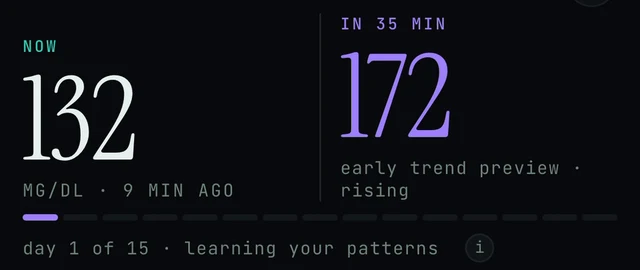
Top of the Today tab. NOW and the forecast sit side by side. The app shows these numbers only while it is open; there is no notification version of them yet.
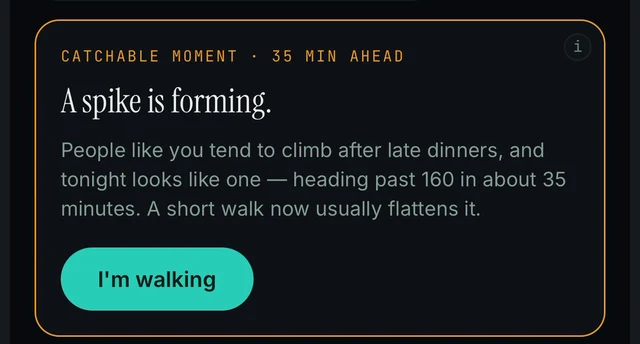
Today tab, scrolled down past Your Curves. The Catchable moment card is the closest thing the app has to an alert today, and you only see it with the app open.
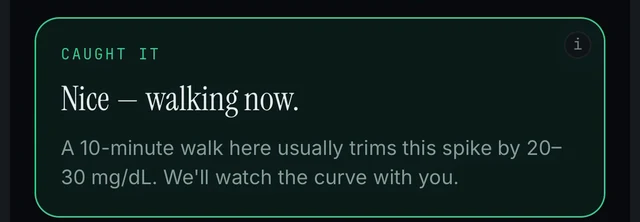
The same card after you tap I'm walking. It changes to CAUGHT IT.
Today → scroll down to Your Curves · Catchable moment card
- Keep using the alarms in your sensor's own app and your meter. Endobits is a wellness app and is not a substitute for your meter or your care team.
- Open Endobits and look at the top of the Today screen. The NOW number and the forecast (for example IN 35 MIN) sit side by side, with the unit and the reading's age underneath.
- Scroll down. Below the chart card and the What if… chips is the CONFIDENCE card with the hit rate. The app's own guidance: a high score means you can lean on the forecast, a low one means check your sensor more often. More on that card: Forecast and confidence.
- Keep scrolling to Your Curves. When the app has spotted something, a CATCHABLE MOMENT card appears below it, with a short note such as "A spike is forming" and a button such as "I'm walking". After you tap it, the card changes to CAUGHT IT. More on this part of the screen: Learning and Your Curves.
- Push notifications, home-screen widgets and Apple Watch are listed as planned for version 5.2. Until they ship, the app has no alerts of its own, so nothing is missing or switched off on your side.
No home-screen or lock-screen widget
Why. Home-screen widgets do not exist yet, on iPhone or on Android. Widgets are planned for version 5.2, and the Android page says there are no home-screen widgets on Android yet. Opening the app is how you see the number today.
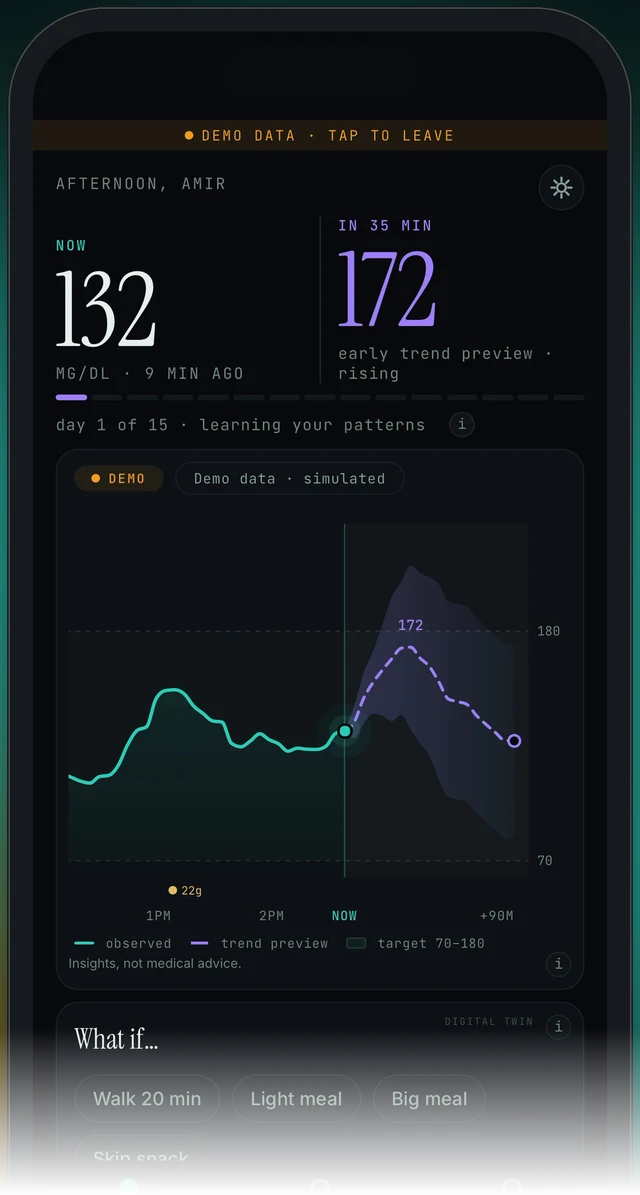
The Today tab (the left tab in the bottom bar). This screen is where the number lives today. There is no widget, lock-screen or watch version of it yet.
Today (bottom tab, left)
- Open Endobits. The Today tab shows the NOW reading with its age underneath (for example "132 MG/DL · 9 MIN AGO") and the forecast beside it ("IN 35 MIN 172") at the top of the screen.
- There is no Endobits widget to add on iPhone or Android yet, so you will not find one in your phone's widget picker. This is expected, not a broken install.
- Home-screen widgets are on the planned list for a future version (5.2), with no release date yet. Keep the app updated through the App Store or Google Play and check the update notes.
No Apple Watch app or watch alerts
Why. Apple Watch support is not in Endobits Companion yet. It is planned for version 5.2 along with push notifications and widgets. Diabits has been retired, and Endobits Companion is a complete rebuild from the same company. The wrist heads-up was a favourite among Diabits users, so people expect it, but it has not shipped in the new app. See Diabits is now Endobits Companion.
Today → NOW and IN 35 MIN
- There is no Endobits app for Apple Watch yet, so there is nothing to install or pair on the watch.
- Use the phone app instead. Open Endobits and read the NOW reading and the forecast number (for example IN 35 MIN) at the top of the Today screen, as in the first figure on this page.
- Keep using your CGM or meter's own alerts for highs and lows. Endobits shows insights, not medical advice, and it never forecasts a low; when readings run low it pauses and says to check your CGM.
- Apple Watch, push notifications and home-screen widgets are planned for version 5.2. There is no release date yet. Keep the app updated and check the update notes.
The app did not warn before a low
Why. The app never forecasts a low. The store listing says it plainly: Endobits never shows a predicted low. When readings run low, the forecast pauses and the app says to check your CGM. That pause is the designed behaviour, not a missed warning. Your sensor's low alarm and your meter are the alarm; Endobits is a wellness app and is not a substitute for them or for your care team.
Today → IN 35 MIN (the forecast)
- Treat your sensor's low alarm and your meter as the source of truth for lows. Endobits never shows a predicted low and does not warn before one.
- If the forecast has paused and the app tells you to check your CGM or meter, that is the low-glucose pause working as designed. Check your meter and follow your care team's guidance.
- If you expected a low warning because of something you read, on endobits.com or elsewhere, tell us through Settings → Report a problem in the app (open Settings from the top-right icon on Today) or email contact@bioconscious.tech, so the wording can be corrected. How to send a report: Settings and Report a problem.
FAQ
- Will Endobits wake me up or alert me if I go high or low?
- No. The app has no push notifications, widgets or Apple Watch support yet; those are planned for version 5.2. It also never forecasts a low. While the app is open it shows your current reading beside a 60-minute forecast and, when it spots something, a Catchable moment card on the Today screen. Your sensor's own alarms stay your alarm.
- Is Endobits Companion a medical device? Can I act on the forecast?
- It is a wellness app that shows insights, not medical advice. The store listing says it is not a substitute for professional medical guidance, your care team, or your meter, and the chart card carries the line "Insights, not medical advice." Use your meter, your sensor's alerts and your care team for any decision about treatment.
- Does it replace my Dexcom, Libre or Eversense app?
- No. Keep your sensor's app. Endobits reads glucose that app writes to Apple Health on iPhone, or Health Connect on Android, or through a direct connection in the Care tab. If the sensor app stops, Endobits has nothing to read and you lose the sensor's alarms too. Setup per sensor: Connect your sensor.
- Is this the same as Diabits? Where did the 30-minute heads-up go?
- Diabits was retired. Endobits Companion is a complete rebuild from the same company, Bio-Conscious Technologies. Diabits accounts and data are not carried over automatically. The watch buzz that Diabits users loved is not in the new app yet; watch and phone alerts are planned for 5.2. Today the app shows a 60-minute forecast on the Today screen (the demo shows IN 35 MIN), and the horizon grows as you name your curves.
- Can I see the NOW number on my watch, a home-screen widget or as a notification?
- Not yet. Push notifications, home-screen widgets and Apple Watch are listed as planned for 5.2 and are not in the app today. There are no home-screen widgets on Android yet either.
- Will the app notify me or buzz my watch when a spike is forming?
- Not yet. Push notifications, home-screen widgets and Apple Watch are planned for version 5.2. Today the card is only visible when you open the app. Keep your CGM app's own alerts on.
- Will a catchable moment warn me before a low?
- No. The app never forecasts a low. When readings run low, the forecast pauses and the app says "check your CGM". Rely on your CGM or meter alerts for lows.
- Is there a home-screen widget or push notification on Android?
- Not yet. There are no home-screen widgets on Android today. Push notifications, widgets and Apple Watch are planned for version 5.2 and are not in the app yet.
Related: Forecast and confidence · Learning and Your Curves · Connect your sensor · Settings and Report a problem · Diabits is now Endobits Companion · Endobits Companion for Android
Still stuck? We answer.
A person at Bio-Conscious reads every message. Tell us your phone model, your sensor, and what you see on the screen.
Real app screens · demo data. Endobits shows insights, not medical advice. Always follow your care team's guidance and your sensor's own alerts for treatment decisions.
More help: All support articles · Connect your sensor · Set up Endobits Companion